User Guide - CITSmart Experience Mobile Application
This document is intended to provide guidance for installing, configuring, and using the CITSmart Experience mobile application, available on both Android and iOS platforms.
The Experience application offers ease of service, targeting where the request is located, filtering of personal and workgroup requests, viewing the details of a service request, among many other possible features due to page rendering and responsive layout.
Before getting started
To use the Experience application, it is necessary:
To create a menu with the options that can be accessed.
Procedure
- Install the Experience application natively from an online store (App Store or Play Store);
- Click on "Connections":
3. The system will open the screen to Configure the Connection:
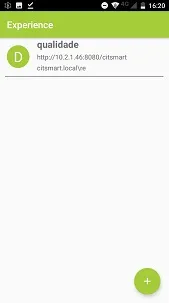
4. If there is already a configuration registered, the user can edit it;
5. To create a new connection, click on "+";
6. The "New Connection" screen to register the connection will appear;
7. Enter the data:
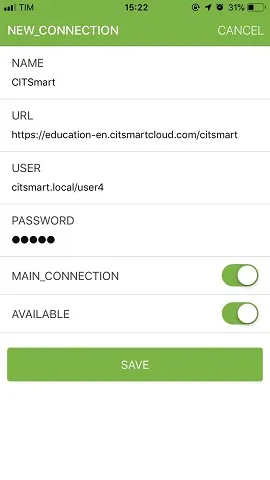
- Name of connection: enter the name of the instance;
- Server URL: inform the server address for connection to the use of the protocol (https) in the URL;
- Domain\User: enter the domain (local/LDAP) and your user;
- Password: system access credential;
- Main Connection: inform if the chosen instance will be the main one;
- Available:
a. Enabled: the system will enable the connection to the server, and the physical positioning of the user will be obtained and registered;
b. Disabled: the system will not allow the connection to the server or register the physical position of the attendant.
8. After entering the data of the connection you want, click on "Save";
9. After the connection is added, the list of created connections will appear. To change a connection, just select and hold the connection and make the change;
10. Log with the user and password used in the CITSmart web;
11. After connecting, it will appear on the screen with the menu of available features.
⚠️ Attention!
If the device is changed, this connection must be deleted.