Artefacts
Before Starting
The tool must display a list or view of all practices.
Procedure
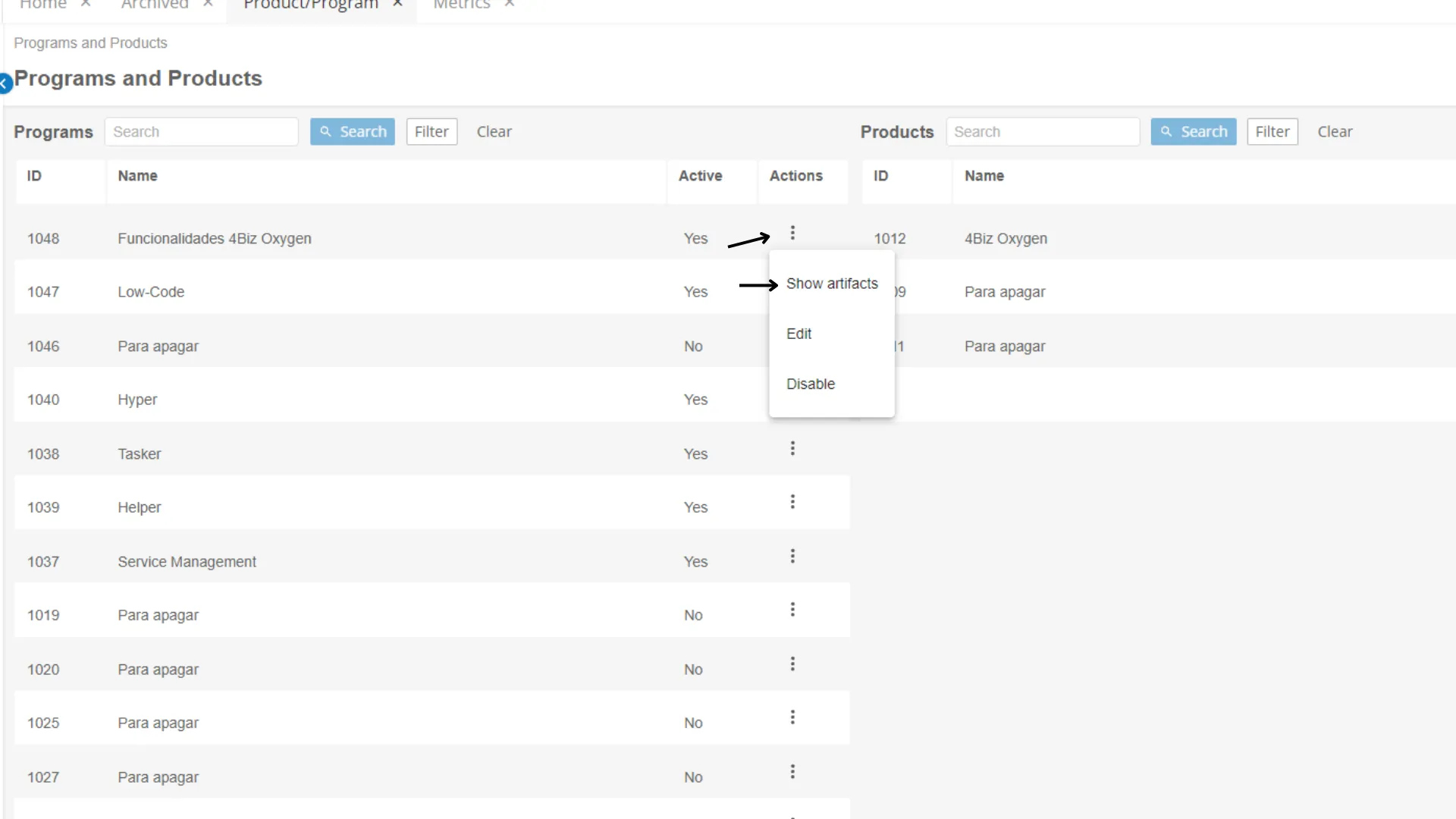
Access the Program and Product screen and select the program for which you want to view the artifacts. To do this, in the Actions column, click on the symbol and select "Show Artifacts" (see image 1);
In the upper right corner, select the "Add Artifact" button and choose from the following options:
- Add Epic
- Add Feature
- Add Story
Add Epic
Within this function, the following fields are present:
Field | Description |
|---|---|
ID Number (*) | Automatically generated by the system |
Name (*) | Name the Epic |
Status | Choose the status: Funnel, Review, Analysis, Backlog, Implementation, or Completed |
Description | Describe the Epic |
WSJF | WSJF is automatically calculated by the system, summing up the business value, time criticality, and risk reduction, and dividing it by the size of the work |
Business Value for the User (**) | Provide the business value for the user |
Risk Reduction (**) | Provide the risk reduction value |
Time Criticality (**) | Provide the time criticality value |
Work Size (**) | Provide the work size value |
(*) Mandatory fields
(**) These fields require inserting a point value ranging from 1-3-5-8-13 and 21 (Fibonacci sequence table follows)
Add Feature
When selecting this function, the following fields appear on the screen:
Field | Description |
|---|---|
ID Number (*) | Automatically generated by the system |
☑ **Enabled ** | Check whether the Feature is enabled or not. If selected, it means it can be used in other Backlogs |
Status | Choose the status: Funnel, Analysis, Backlog, Implementation, Validation, Deployment, Released, or Canceled |
Name (*) | Name the Feature |
Epic | Select the Epic |
Description | Describe the Feature |
WSJF | WSJF is automatically calculated by the system, summing up the business value, time criticality, and risk reduction, and dividing it by the size of the work |
Business Value for the User (**) | Provide the business value for the user |
Risk Reduction (**) | Provide the risk reduction value |
Time Criticality (**) | Provide the time criticality value |
Work Size (**) | Provide the work size value |
(*) Mandatory fields
(**) These fields require inserting a point value ranging from 1-3-5-8-13 and 21 (Fibonacci sequence table follows)
Add Story
Within this function, the following fields are present:
Field | Description |
|---|---|
ID Number (*) | Automatically generated by the system |
☑ **Enabled ** | Check whether the Story is enabled or not. If selected, it means it can be used in other Backlogs |
Story Points (*) (**) | Select the Story Points, which represent the effort level defined by the team to complete the Story |
Status | Choose the status: To Do, Ready, In Progress, Ready for Testing, Testing, Completed, or Canceled |
Name (*) | Name the Story |
Feature | Select the Feature |
Description | Provide the description for the Story |
(*) Mandatory fields
(**) These fields require inserting a point value ranging from 1-3-5-8-13 and 21 (Fibonacci sequence table follows)
Taskbar Tabs

Checklist
- In this tab, a checklist will be created when added. Next to the list, there is an option to add a new item, edit the list name, and delete it.
- When adding an item to the list and hovering over it, an option to edit the item name and delete it will be displayed.
- To indicate the completion of an item, select the checkbox.
Comments
- It is the list of comments made, with the username displayed.
- If the comment is from the logged-in user on the machine, an option to edit and delete the comment will be displayed.
Attachments
- Its purpose is to add attachments to the Epic.
Logged Hours
- Select the date of the recorded working hours, the start and end time, and provide a description.
History
- Shows all actions taken on the Epic, such as date, time, and user.
Kanban Screen
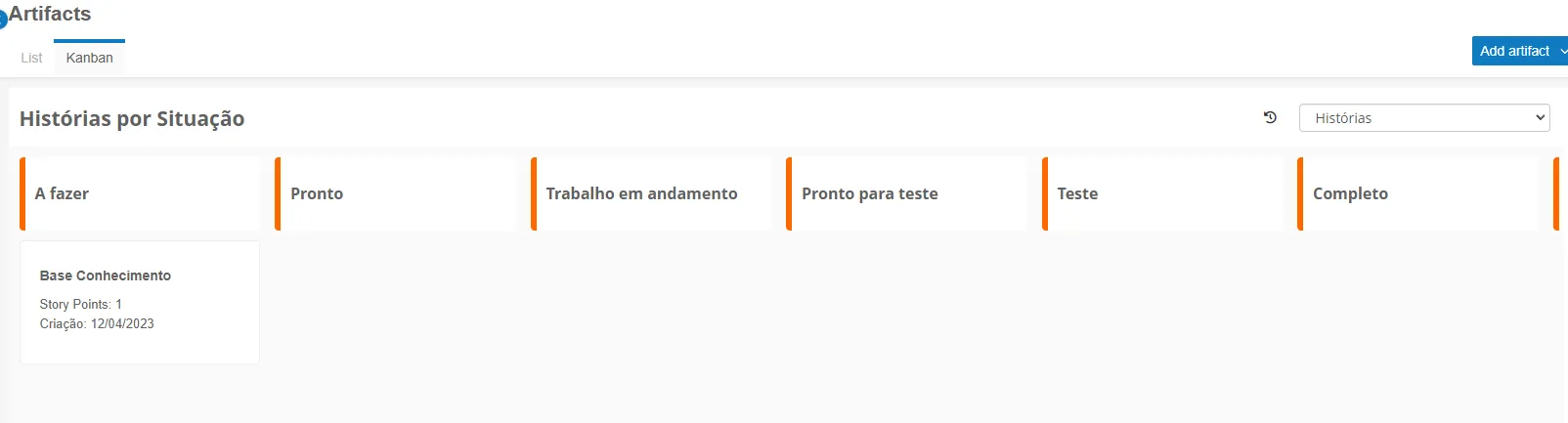
To select the type of artifact to be displayed (Epic, Feature, or Story), click on the top right button "Add Artifact".
The chosen artifact will then appear on the screen.
Epic
Functions |
|---|
Presents the lanes with default statuses |
Created Epics will be displayed with names, WSJF, and creation date |
Epics will be ordered from the highest to lowest **WSJF **value |
Epics can be moved between **statuses ** |
Reordering of priorities will be done automatically based on WSJF value |
Selecting an Epic will display its editing screen |
Feature
Functions |
|---|
Presents the lanes with default statuses |
Created Features will be displayed with names, WSJF, and creation date |
Features will be ordered from the highest to lowest **WSJF **value |
Features can be moved between statuses |
Reordering of priorities will be done automatically based on WSJF value |
Selecting a Feature will display its editing screen |
Story
Functions |
|---|
Presents the lanes with default statuses |
Created Stories will be displayed with names, Story Points, and creation date |
Stories will be ordered from the highest to lowest **Story Point **value |
Stories can be moved between **statuses ** |
Reordering of priorities will be done automatically based on WSJF value |
Selecting a Story will display its editing screen |
Glossary
WSJF
WSJF stands for Weighted Shortest Job First. WSJF is a technique used in the Scaled Agile Framework (SAFe) to prioritize work and make decisions about which features or functionalities should be implemented first, based on a value and risk analysis.
WSJF is
calculated taking into account four main factors:
- Business Value: The perceived value by customers or stakeholders, often measured in terms of benefits, potential revenue, cost savings, competitive advantage, among others.
- Estimate of Effort: Represents the effort required to implement the feature or work, measured in terms of time, complexity, necessary resources, etc.
- Time Criticality: Reflects the urgency and value of delivering the feature as soon as possible. Some features may have tight deadlines or be required to fulfill other business requirements or opportunities.
- Risk of Delay: Considers the risks associated with implementing the feature, such as technical risks, dependencies, uncertainties, or negative impacts if the work is delayed.
WSJF is calculated by dividing the Business Value by the Estimate of Effort and then weighting it by Time Criticality and Risk of Delay. The result is a score indicating the relative priority of the work.
WSJF is a valuable tool for prioritization decisions in SAFe as it considers both the business value and associated risks. It helps identify and prioritize work items that bring the most value and least risk to the business, enabling the team to focus on strategically important initiatives and minimizing wasted efforts on lower-value tasks.
Epic
- An epic is a larger unit of work, representing a high-level initiative or broad objective.
- It is usually large and comprehensive, requiring decomposition into smaller parts for ease of planning and execution.
- Epics provide a high-level view and strategic guidance for software development.
Feature
- A feature is a specific and identifiable part of a system or product.
- It represents a set of functionalities that add value to users.
- A feature can be planned, developed, tested, and delivered independently.
Story
- A story is an even smaller and more granular unit of work than a feature.
- It describes a specific functionality of the software from the user's perspective.
- A story typically follows a short and simple sentence format, describing what the user wants to achieve and why.