API
API and integration accounts
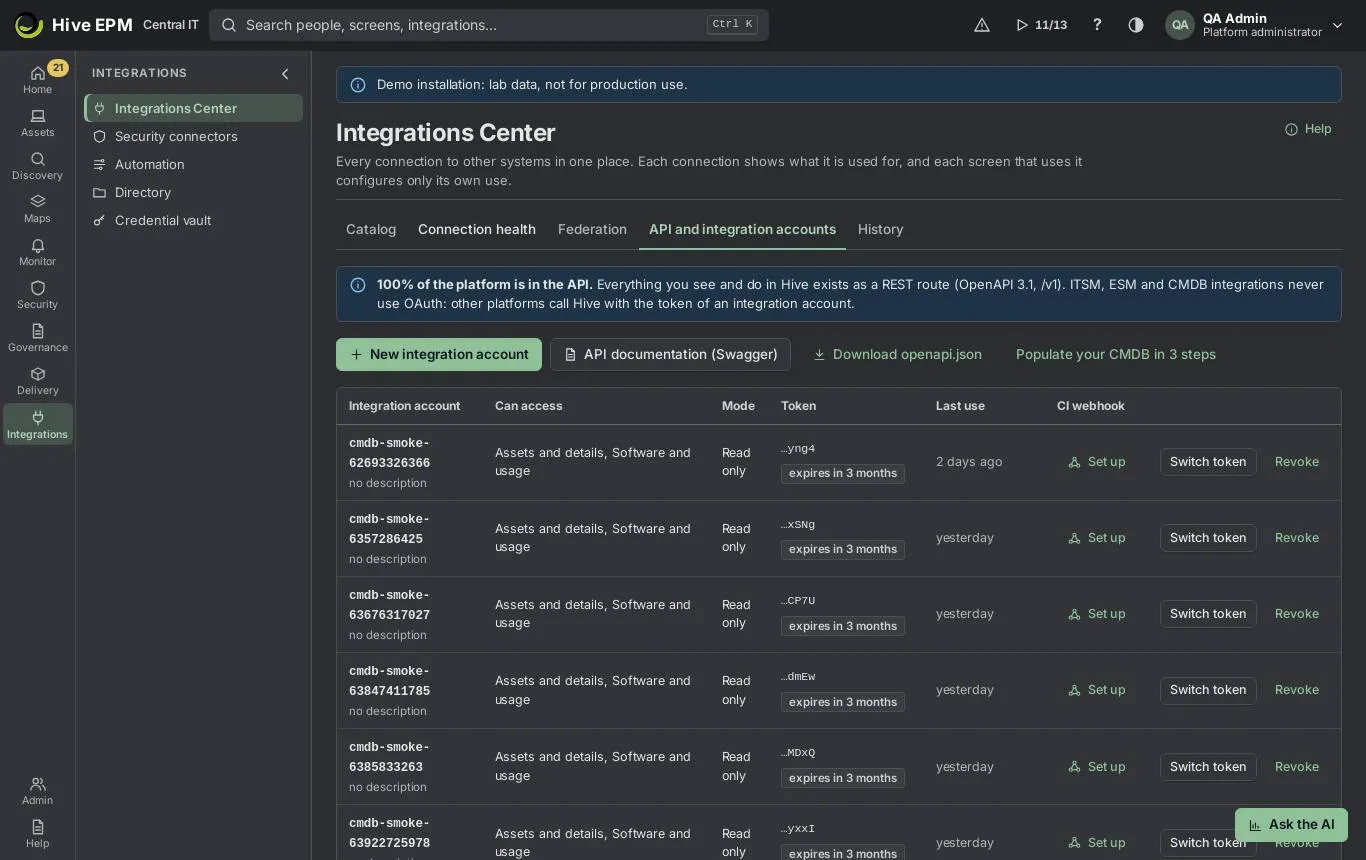
Screen: API and integration accounts (1/2)
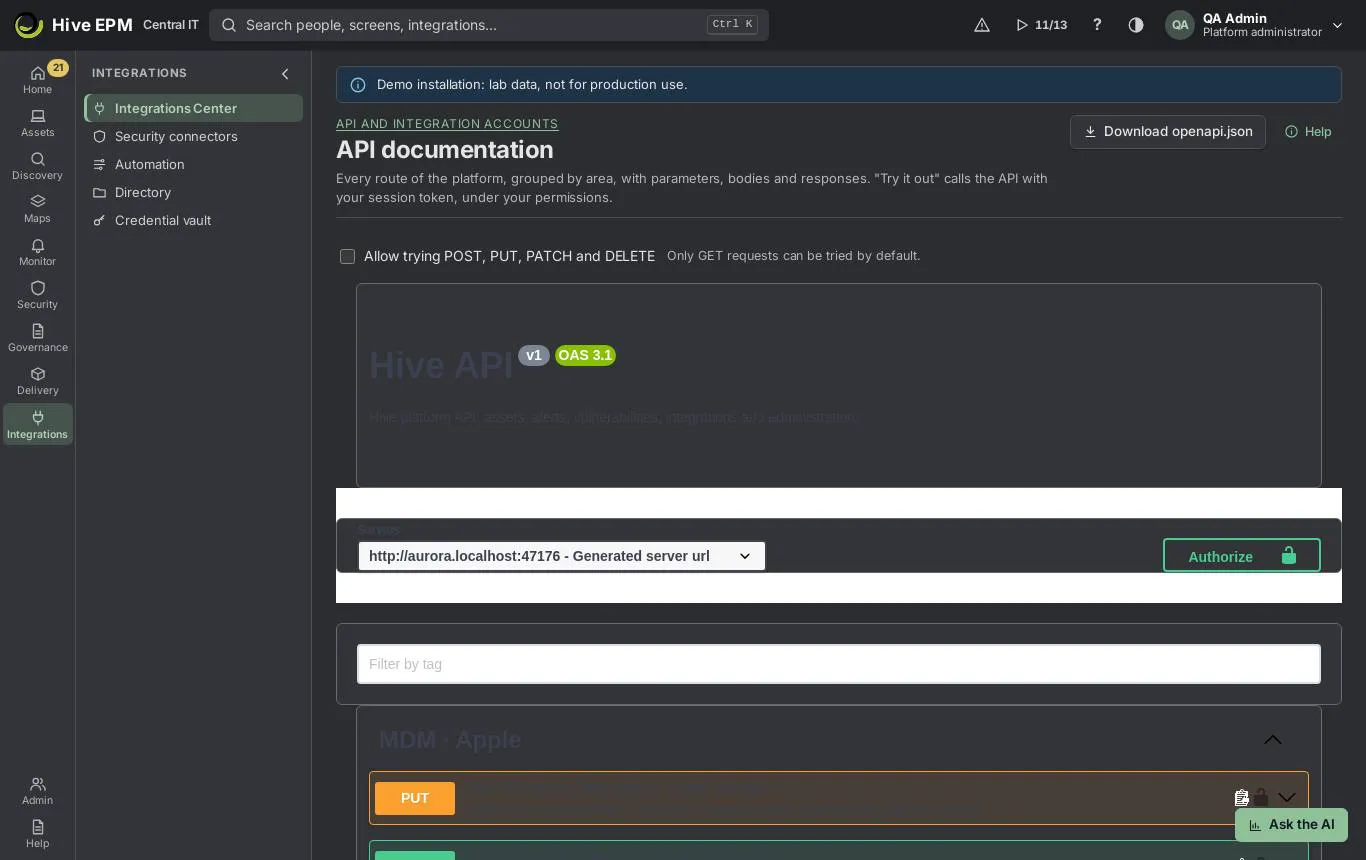
Screen: API and integration accounts (2/2)
Everything you see and do in Hive is available in the REST API (OpenAPI 3.1, /api/v1 ). Other platforms use an integration account with a token sent as Authorization: Bearer <token> . The accounts are in Integrations › Integrations Center › API and integration accounts (needs permission to administer the API); the documentation of every route is in API documentation (Swagger).
What you can do here
Create an integration account per platform, choosing the data domains, the mode, the token validity, allowed IPs, mTLS and a request limit.

Switch (rotate) or revoke a token.

Turn on the CI webhook of an account, pause it, replace its secret and resend deliveries.

Browse and try every route in API documentation, and download openapi.json .

Create an integration account
Click New integration account.
Give the account a name with lowercase letters, numbers and hyphens, like cmdb-servicenow , and say what it is for. The name appears in the audit trail of every call.
Choose the Data domains the account can use: Assets and details, Software and usage, Relationships and maps, Network, Cloud/virtualization/Kubernetes, Contracts and licenses, Vulnerabilities and insights, Alerts and events, Tickets and changes, Reports, Audit trail, People and identity, Device trust signal, Telemetry (OpenTelemetry) and Provider control plane. Choose the Mode: Read only (recommended) or Read and send (needed to import assets, change alerts or post tickets and changes). Optionally choose the CMDB model of the responses (Hive model, ServiceNow CSDM or DMTF CIM) and a Webhook for change notices (https).
Choose the Token validity (90, 180 or 365 days), optionally the Allowed IPs (ranges like 198.51.100.0/24), Require client certificate (mTLS) and the Request limit per minute (default 600; above it the API answers 429 with Retry-After).
Click Create account and token. Copy the token now: it is shown only once, and Hive keeps only a fingerprint of it. Test the token now checks it; Example call shows a ready request.
The accounts list
Columns: Integration account, Can access, Mode, Token (expiry; a warning 15 days before), Last use and CI webhook (On, Set up or Paused).
Switch token creates a new token (valid for 365 days); the old one keeps working for 7 days so the other platform can update, and then expires by itself. During that time the row shows "Two tokens valid during the switch (7 days)."

Revoke stops every call immediately and cannot be undone; to connect again, create a new account.

CI webhook: Receiving address, Turn on webhook, Pause/Resume, Replace secret, Send test, and the deliveries with Send again. Validate X-Hive-Signature : HMAC-SHA256 of "timestamp.body" with the secret shown once.

The same tab has Populate the CMDB of your platform, the Inbound routes (POST) and the Read proxy (optional), a small program in the DMZ that serves only GET routes.
API documentation
API documentation (Swagger) opens the documentation of every route, grouped by area, with parameters, bodies and responses (needs permission to read integrations or administer the API).
Use the filter box to find an area (tag).

Try it out calls the API with your session, under your permissions. Only GET can be tried by default; tick Allow trying POST, PUT, PATCH and DELETE and confirm to run write requests for real (they go to the audit log).

Download openapi.json saves the contract to import in Postman or Bruno.

Worked example: a read-only account for the ServiceNow CMDB
- API and integration accounts › New integration account. Account namecmdb-servicenow , What it is for "Nightly CMDB sync".
- Data domains Assets and details, Software and usage, Relationships and maps; Mode Read only; CMDB model of the responses ServiceNow CSDM.
- Token validity 365 days, Allowed IPs198.51.100.0/24 (the ServiceNow MID server range), limit 600.
- Create account and token, Copy token, Test the token now: "The token works: Hive recognized the integration account." Click I copied the token — close.
- ServiceNow calls GET /api/v1/cis?changed_since=0&limit=500 with Authorization: Bearer hive_tk_… . A call from another IP is refused.
- Eleven months later the row shows the expiry warning. Click Switch token, give the new token to the ServiceNow admin; the old one stops by itself 7 days later.
Worked example: find and try a route in the documentation
- API documentation (Swagger), filter alerts .
- Open GET /api/v1/alerts , Try it out, type asset=<id> and Execute: the answer shows the open alerts of that device, with the request duration.
- To test POST /api/v1/assets/lookup , tick Allow trying POST, PUT, PATCH and DELETE, confirm Allow, and execute; the call is recorded in the audit with your name.
- Click Download openapi.json and import it in Bruno for the integration team.
Pitfalls and limits
 | The limit applies per account and per core node; responses carry RateLimit-Limit , RateLimit- |
|---|
Remaining and RateLimit-Reset .
A revoked account cannot be restored.

Creating, switching and revoking need permission to administer the API.

Through the read proxy only read-only accounts work.

The webhook address must be public https; private addresses are refused.

There is no OAuth for integration accounts.

Related
Populate your CMDB in 3 steps

Integrate with the GRCS

Grafana and Power BI

ITSM tickets, CMDB and approved changes

Populate your CMDB in 3 steps
Any platform can keep its CMDB equal to Hive without a dedicated connector: an initial load, then only what changed, then change notices. Everything uses an integration account created in Integrations ›Integrations Center › API and integration accounts, with the scope Assets and details (and Software and usage to include the installed software).
What you can do here
Export all configuration items (CIs) at once, in the Hive model, ServiceNow CSDM or DMTF CIM.

Read only what changed since the last read, including removed items.

Receive a signed POST for each created, changed or removed CI.

- Initial load
GET /api/v1/cis/export?model=hive|csdm|cim&include=software returns all active CIs as NDJSON (one CI per line), as the file hive-cis.ndjson .
Or read in pages: GET /api/v1/cis?limit=500 and then GET /api/v1/cis?cursor=<nextCursor> until hasMore is false. limit goes up to 2000.

Each item has id , class , removed , updatedAt , attributes and, when asked, relationships . The model comes from the account (CMDB model of the responses) or from model= .

- Only what changed
The last page of a read brings syncToken . Keep it.

Next time call GET /api/v1/cis?changed_since=<syncToken> : you get only new and changed CIs, and the retired ones with removed: true . Page with cursor as before and keep the new syncToken . changed_since=0 (or no parameter) is a full read.

- Change notices
Instead of polling, turn on the CI webhook of the account (column CI webhook › Set up, or Webhook for change notices in the wizard). Hive POSTs ci.created , ci.updated and ci.removed with the body {type, occurredAt, ci} and the headers X-Hive-Event , X-Hive-Delivery , X-Hive-Timestamp and X-Hive-Signature: sha256=<HMAC-SHA256 of "timestamp.body"> . Failures are retried from 30 s up to 12 h. Changes can also go to an event bus (Kafka, RabbitMQ, Service Bus, SNS, Pub/Sub).
Tools
Download the contract with Download openapi.json (or open API documentation (Swagger)) and import it in Postman or Bruno to get the full collection. Every call uses Authorization: Bearer <token> .
Worked example: ServiceNow CSDM load, then a nightly delta
- Create the integration account cmdb-servicenow : Data domains Assets and details and Software and usage, Mode Read only, CMDB model of the responses ServiceNow CSDM. Copy the token.
- Initial load: `` curl -H "Authorization: Bearer hive_tk_…" "https://hive.centralit.com.br/api/v1/cis/export?include=software" -o hive-cis.ndjson ` 4,180 lines arrive, classes such as cmdb_ci_server , cmdb_ci_vm_instance , cmdb_ci_computer and cmdb_ci_netgear , with "Installed on::Installs" relationships to cmdb_ci_spkg`.
- Read once with GET /api/v1/cis?limit=2000 until hasMore is false and store the syncToken of the last page.
- The next night: GET /api/v1/cis?changed_since=<syncToken>&limit=2000 returns 23 items: 20 changed, 2 new and NB-OLD-17 with removed: true (it was retired). The job sets it to retired in the CMDB and stores the new token.
- Later, the team turns on the CI webhook to https://centralit.service-now.com/api/x_hive/ci : each change arrives within seconds, signed; the receiver checks X-Hive-Signature with the secret shown once.
Pitfalls and limits
An invalid sync token returns 422 ( invalid-sync-token ); start over with a full read.

The export is not resumable; for very large bases, read in pages with cursor .

Webhook events go only to accounts with the Assets scope, from the moment it is turned on (no back-fill), and only for the subscribed assets when the account has a list.

The webhook address must be public https.

The contract ( /api/openapi.json ) requires sign-in unless the administrator made the API docs public.

Related
API and integration accounts

Integrate with the GRCS

ITSM tickets, CMDB and approved changes

Integrate with the GRCS
The GRCS brings from Hive only the assets that have an active risk or an open nonconformity: the asset record, open vulnerabilities, open alerts, business services and the control evaluation with evidence. It uses an integration account and the REST API; the GRCS card in Integrations › Integrations Center › Catalog (category GRC and risk) opens the account wizard with the right scopes.
What you can do here
Create the GRCS integration account with a webhook and a request limit.

Link each GRCS target to a Hive asset by its identifiers.

Subscribe the account to the assets that matter, by id or tag.

Read assets, findings, alerts, business services and compliance in batches, and receive events.

- Integration account
In Integrations Center › API and integration accounts, click New integration account (or Connect on the GRCS card). Choose the Data domains Assets and details, Vulnerabilities and insights, Alerts and events and Reports; Mode Read only (choose Read and send only if the GRCS writes its reference back). Fill in Webhook for change notices (optional) and Request limit per minute. The token is shown once.
- Link each GRCS target to the asset
POST /api/v1/assets/lookup with up to 500 identifiers ( id , externalRef , hwUuid , serial , fqdn , hostname , ip , or no type to try them in this order). Each answer says found , none or ambiguous (with candidates) and which identifier matched. IP is the last resort: an ambiguous match never links.
Optional: write the GRCS reference with PUT /api/v1/assets/import (source grcs , externalId = target id; needs Read and send). Later, GET /api/v1/assets?externalRef=grcs:<id> finds it.

- Subscribe to the assets that matter
PUT , PATCH or DELETE /api/v1/api-accounts//assets with asset ids or tags (for example the tag grcs ). The account itself can keep its list with its own token. With a list, the webhook and the events only cover the subscribed assets; without one, everything the scopes allow. Up to 5,000 assets and 100 tags per call, 50,000 entries per account.
- Read in batches
GET /api/v1/assets//full — the asset with hardware, software, services, databases and relationships.
GET /api/v1/vulnerabilities/findings?asset=a,b,c and GET /api/v1/alerts?asset=a,b,c — up to 200 assets per call; with changedSince (24h, 7d or an ISO date) the list comes in change order and the next page is in the Hive-Next-Cursor header.
GET /api/v1/business-services?asset=a,b — services each asset is part of, its role (component or dependency) and whether it is a single point of failure.
GET /api/v1/assets//compliance or POST /api/v1/compliance/assets (up to 200 assets) — each control of ISO 27001, PCI DSS, LGPD/GDPR, HIPAA and CIS v8 that applies to the asset: atendido , parcial , nao_atendido or na , percentage and the measured evidence with its date.
- Events
The webhook receives vulnerability.opened , vulnerability.closed , vulnerability.risk_changed (severity, KEV or EPSS band changed) and compliance.changed , with subject = asset id and the X-Hive-Signature HMAC signature, besides the ci.* events. The same events can go to an event bus filtered by an asset tag.
Worked example: the GRCS follows 40 critical servers
- Catalog › GRCS › Connect: the wizard opens with the scopes chosen. Name grcs , webhook https://grcs.centralit.com.br/hooks/hive , limit 600 per minute. Copy the token and the webhook secret.
- The GRCS sends its 40 targets: POST /api/v1/assets/lookup with {"identifiers":[{"value":"SRV-ERP-01"},{"type":"serial","value":"CZ1234ABC"},…]} . 38 come back found , 1 none , 1 ambiguous with two candidates (the analyst picks the right id).
- Tag the 39 assets with grcs in Hive and subscribe: PUT /api/v1/api-accounts/<account id>/assets with {"tags":["grcs"]} .
- Every night: GET /api/v1/vulnerabilities/findings?asset=<39 ids>&changedSince=24h , following Hive- Next-Cursor until it is absent; then POST /api/v1/compliance/assets with {"assets":
[…],"framework":"iso27001"} . |
|---|
- During the day, a new KEV vulnerability on SRV-ERP-01 sends vulnerability.opened to the webhook; the GRCS opens the risk with the evidence.
Pitfalls and limits
Above the account limit the API answers 429 with Retry-After ; every response carries RateLimit-Limit , RateLimit-Remaining and RateLimit-Reset . The limit applies per core node. The parameter is changedSince here; the CI route uses changed_since .
Related
API and integration accounts

Populate your CMDB in 3 steps

Compliance and hardening

Vulnerabilities

Grafana and Power BI
Screen: Grafana and Power BI
Hive serves ready datasets for BI tools under /api/v1/bi , read only: plain JSON for Grafana and an
OData v4 feed for Power BI. Both use an integration account token ( Authorization: Bearer <token> ), and
each dataset checks the read permission of its domain, so an account sees only what its scopes allow.
The Grafana and Power BI cards in Integrations › Integrations Center › Catalog (category BI) create
that account for you.
What you can do here
Create a read-only account for Grafana or Power BI in one click from the catalog.

List the datasets available to the account and read them as JSON or OData.

Build Grafana panels with time series ( from / to from the dashboard) and Power BI reports that

refresh from the feed.
Datasets
Dataset (JSON) | OData entity set | What it has | Needs the scope |
|---|---|---|---|
assets | Assets | id, name, hostname, type, osFamily, os, osVersion, vendor, model, serial, site, user, status, firstSeen, lastSeen | Assets |
assets-by-type | AssetsByType | type, assets (active) | Assets |
alerts-by-severity | AlertsBySeverity | severity, alerts (open), always 4 rows | Alerts |
alerts-open-over- time | OpenAlertsOverTime | time, critical, major, warning, info, total | Alerts |
vulnerabilities-by- severity | VulnerabilitiesBySeverity | severity, findings, cves, assets | Vulnerabilities |
patch-compliance | PatchCompliance | status (compliant, missing-security, missing-other, not-scanned), assets, percent | Assets |
license-usage | LicenseUsage | product, edition, metric, acquired, consumed, inUse, balance, status | Assets or Contracts |
Every dataset respects the profile's asset scope (sites, tags, groups) of whoever calls.
JSON for Grafana
GET /api/v1/bi lists the datasets with title, columns, the permission, whether it is available to this caller, and the paths.
GET /api/v1/bi/<dataset> returns a JSON array of rows.
from and to : Grafana milliseconds ( $ , $ ) or ISO 8601; default the last 7 days. interval : 5m, 15m, 1h, 6h or 1d; without it, up to 2 days → 15m, up to 31 days → 1h, longer →1d (at most 5000 points).
limit (default 1000, up to 10000) and offset ; the next page is in the Link: <…>; rel="next" header.
OData for Power BI
 | Service document: GET /api/v1/bi/odata ; metadata: GET /api/v1/bi/odata/$metadata ; data: GET |
|---|
| /api/v1/bi/odata/<EntitySet> . |
|---|---|
 | Query options: $select , $top , $skip , $count and $format . The server pages by 1000 rows with |
@odata.nextLink . $filter and $orderby are refused ("Filter and sort in Power Query after loading the data").
Datasets the account cannot read are left out of the service document and of $metadata .

Worked example: Grafana panel of assets by site
- Catalog › BI › Grafana › Connect. The New integration account wizard opens with grafana , Read only and the scopes Alerts, Assets and Vulnerabilities. Create it and copy the token.
- In Grafana, install the Infinity data source plugin and add a data source: URL https://hive.centralit.com.br , header Authorization = Bearer hive_tk_… (as a secure header).
- New panel, query type JSON, URL /api/v1/bi/assets?limit=10000 . Columns appear: name, type, site, status… 4. Add the transformation Group by: group by site , calculate id → Count. Choose a bar chart: São Paulo 1,240, Rio de Janeiro 610, Recife 180.
- Second panel: URL /api/v1/bi/alerts-open-over-time?from=$&to=$ , a time series with critical, major, warning and info. Changing the dashboard time range to 30 days switches the points to 1 hour.
Worked example: Power BI OData feed with an API account
- Catalog › BI › Power BI › Connect, create the account powerbi and copy the token. If finance also needs licenses, it already has them through the Assets scope.
- In Power BI Desktop: Get data › Blank query, and in the advanced editor: `` =
OData.Feed("https://hive.centralit.com.br/api/v1/bi/odata", [Authorization="Bearer hive_tk_…"], |
|---|
[Implementation="2.0"]) `` 3. The navigator lists Assets, AssetsByType, AlertsBySeverity, OpenAlertsOverTime, VulnerabilitiesBySeverity, PatchCompliance and LicenseUsage. Load LicenseUsage and PatchCompliance.
- Filter in Power Query (for example status <> "compliant" ); a $filter in the URL would be refused.
- Build the report "Licenses: acquired × in use" with product , acquired and inUse . Each refresh reads the feed again, page by page.
Pitfalls and limits
Only the Bearer token is accepted: no user and password (Basic), and no token in the address.

A dataset without the permission answers 403 ("This account cannot read this dataset."); without a token, 401.

The account rate limit applies (default 600 calls per minute); big Grafana dashboards with many panels count every panel.

The BI routes can also be served by the read proxy in the DMZ, with a read-only account.

The Power BI and Grafana screens are not part of Hive; their menu names may change between versions.

Related
API and integration accounts

Reports and dashboards

Integrations Center
