CITSmart auto-login -SSO
Branchs:
- Sso (itsm)
- Spnego 1.0 (artifactory)
Create user AD
- Access "create user" in Users and Computers of the Active Directory, as in the image below:
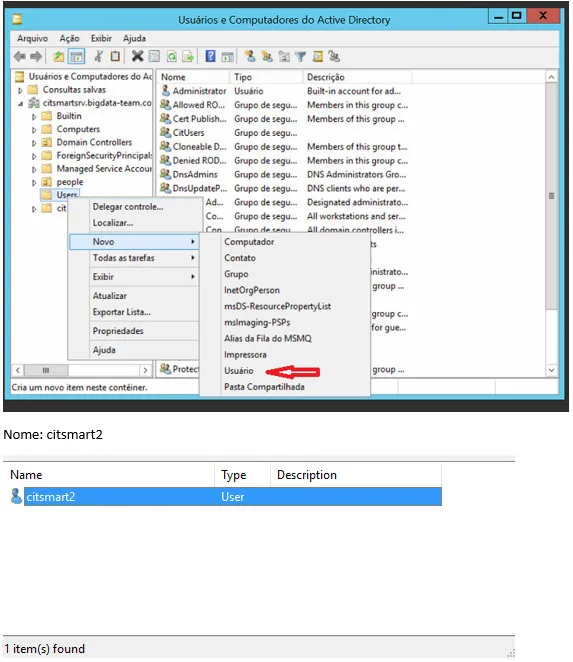
2. Create a password:
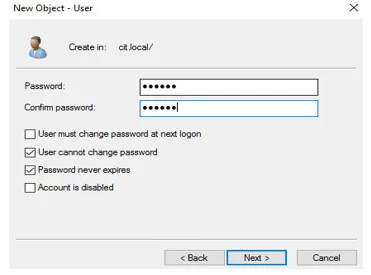
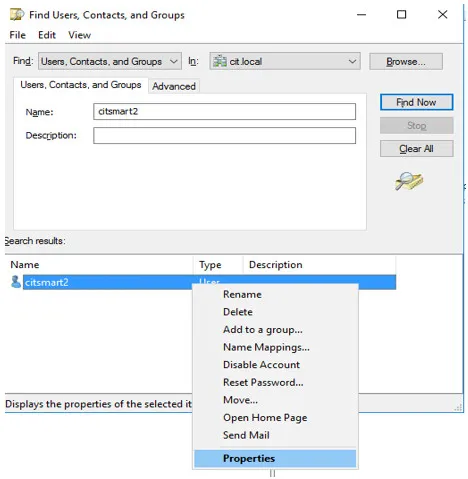
3. Click on the right side of the mouse, in the button user/properties:
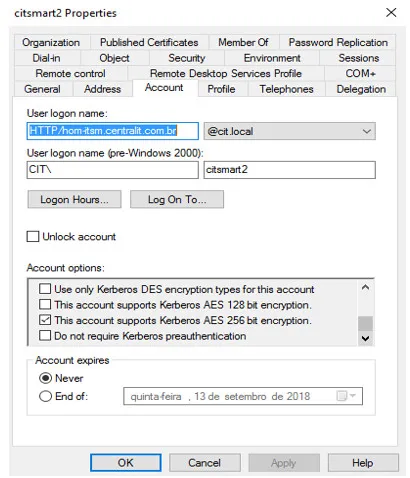
4. Select the "This account supports 256-bit encryption" option, apply it, and check "OK", as below:
5. Open the ADSI Edit. Then, connect in the AD, click on users and locate the user newly created, as below:
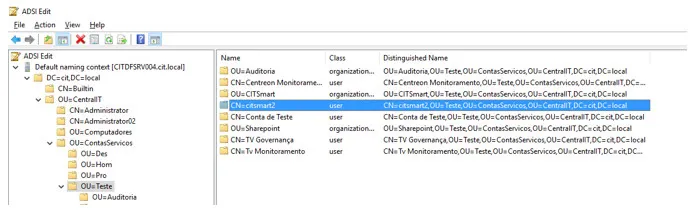
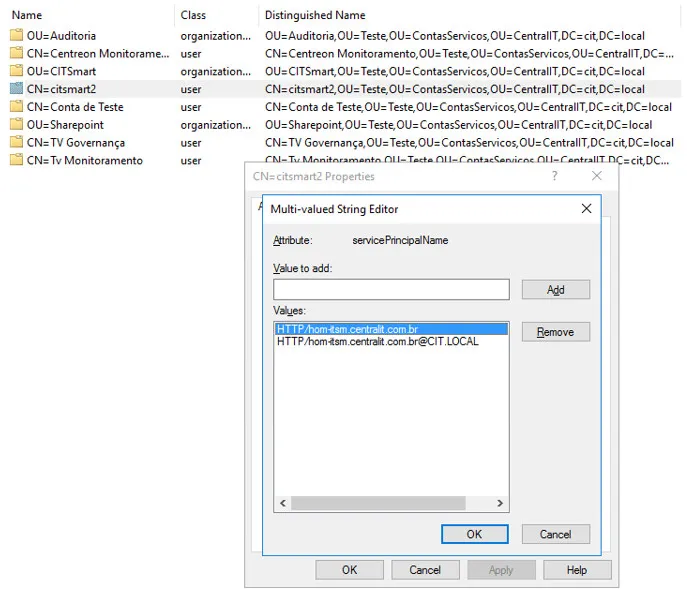
6. Right-click and select the Properties option. Then, search for the ServicePrincipalName (SPN);
7. Add HTTP/hom-itsm.centralit.com.br, click on "OK", as in the image below:
8. Open the CMD as Administrator and put the following commands. Remember that the first sets the SPN and the second creates the Keytab (which will be used in the Wildfly):
- setspn -s HTTP/hom-itsm.centralit.com.br citsmart2
- ktpass / princ HTTP/hom-itsm.centralit.com.br /mapuser citsmart2 /pass central@123 /ptype KRB5_NT_Principal/outcitsmart2.keytab /crypto ALL
9. Making the steps above, the AD will be configured.
Configure the Wildfly server
- Copy the war generated from the branch sso;
- Copy the file krb5.conf (validate the information according to the AD) to the folder standalone/configuration (wildfly):
    ```sh
    [libdefaults]
    default_tkt_enctypes = aes256-cts-hmac-sha1-96 aes128-cts-hmac-sha1-96 rc4-hmac
    default_tgs_enctypes = aes256-cts-hmac-sha1-96 aes128-cts-hmac-sha1-96 rc4-hmac
    permitted_enctypes = aes256-cts-hmac-sha1-96 aes128-cts-hmac-sha1-96 rc4-hmac
    [realms]
    ```

    ```sh
    citgosrv004.cit.local  = {
    kdc = citsmartsrv.citsmartsrv.bigdata-team.com
    default_domain = citsmartsrv.citsmartsrv.bigdata-team.com }
    ```

    ```sh
    [domain_realm]
    .citsmartsrv.citsmartsrv.bigdata-team.com = citsmartsrv.citsmartsrv.bigdata-team.com
    ```
Copy the file login.conf (validate the information according to the AD) to the folder standalone / configuration (wildfly):
    ```sh
    custom-client {
    com.sun.security.auth.module.Krb5LoginModule required
    storeKey=true
    useKeyTab=true
    keyTab="file:///opt/wildfly-12.0.0.Final/standalone/configuration/lightkeytab.keytab"
    principal=HTTP/light-desenvolvimento.citsmartcloud.com\@CITSMARTSRV.BIGDATA-TEAM.COM;
    };
```- Copy the lightkeytab.keytab file (generated by the command in AD) to the standalone / configuration (wildfly) folder;
- Fix standalone.xlm by adding the following information:
In \<system-properties>
    ```java
    \<property name="sun.security.krb5.debug" value="true"/\>
    \<property name="java.security.krb5.kdc" value="CITSMARTSRV.BIGDATA-TEAM.COM"/\>
    \<property name="java.security.krb5.realm"value="CITSMARTSRV.BIGDATA-TEAM.COM"/\>
    \<property name="java.security.krb5.conf"value="/opt/wildfly-12.0.0.Final/standalone/configuration/krb5.conf"/\>
    \<property name="java.security.auth.login.config"value="/opt/wildfly-12.0.0.Final/standalone/configuration/login.conf"/\>
    \<property name="krb.keyTab"value="/opt/wildfly-12.0.0.Final/standalone/configuration/lightkeytab.keytab"/\>
    \<property name="krb.principal"value="HTTP/light-desenvolvimento.citsmartcloud.com\@CITSMARTSRV.BIGDATA-TEAM.COM"/\>
    ```
In \<security-domains>
    ```java
    \<security-domain name="spnego-server"\>
    \<authentication\>
    \<login-module code="com.sun.security.auth.module.Krb5LoginModule"flag="required"\>
    \<module-option name="storeKey" value="true"/\>
    \<module-option name="useKeyTab" value="true"/\>
    \<module-option name="keyTab" value="\${krb.keyTab}"/\>
    \<module-option name="principal" value="\${krb.principal}"/\>
    \<module-option name="isInitiator" value="false"/\>
    \</login-module\>
    \</authentication\>
    \</security-domain\>
    \<security-domain name="SPNEGO" cache-type="default"\>
    \<authentication\>
    \<login-module code="Kerberos" flag="required"\>
    \<module-option name="storeKey" value="true"/\>
    \<module-option name="refreshKrb5Config" value="true"/\>
    \<module-option name="useKeyTab" value="true"/\>
    \<module-option name="doNotPrompt" value="true"/\>
    \</login-module\>
    \</authentication\>
    \</security-domain\>
```- If you do not have changed the jar of the policy of JAVA (JCE - Java Cryptography Extension), download the files and put in jdk/jre/lib/security/policy/limited and jdk/jre/lib/security/policy/unlimited;
- Import (synchronize) users of LDAP in ITSM.
⚠️ Attention!
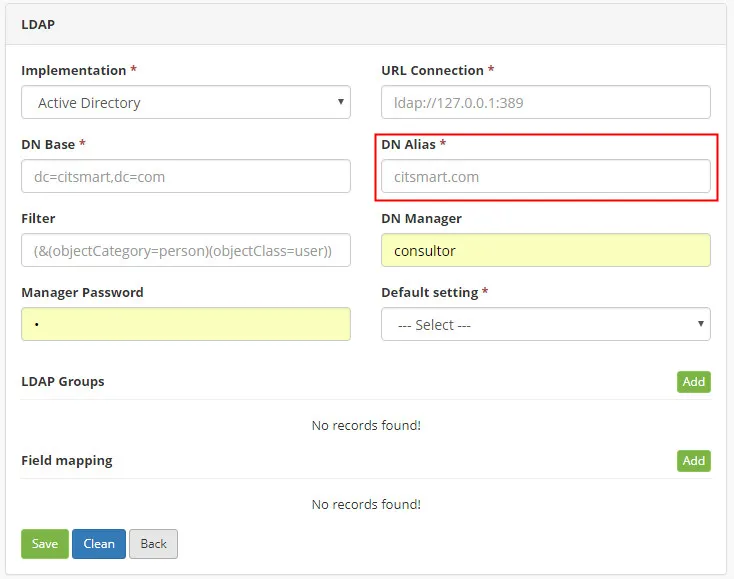
The DN Alias should be the same as the network domain (example: CIT\user), than the DN Alias = CIT, as below:
⚠️ Attention!
It is recommended to read the following support materials: https://ss64.com/nt/setspn.html and http://spnego.sourceforge.net/