Registering LDAP Connection
LDAP (Lightweight Directory Access Protocol) is a standard protocol that allows managing directories, that is, accessing information banks about the users of a network through TCP/IP protocols.
You can configure CITSmart to query available user bases in a directory service (Microsoft Active Directory or open-LDAP), which allows these users to authenticate at CITSmart by using their credentials without having to manually enroll them (at CITSmart).
Today, the reading of data from an AD/LDAP server boils down to the "user" object. That way you can use filters to bring them to CITSmart. Moreover, you can use the "Field Mapping" option to upload attribute information (e.g.: email, phone, location, and others).
Below is an authentication model for CITSmart Cloud customers who want to use their on-premises directory base.
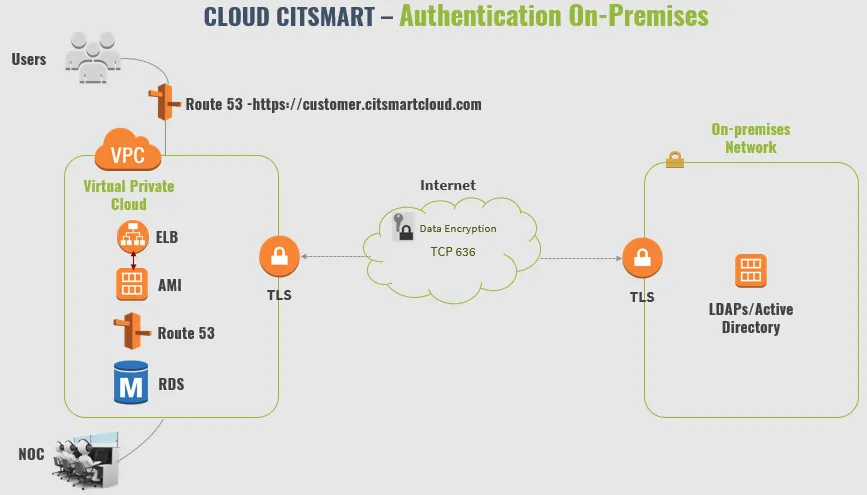
Before getting started
If you want to automatically set up and synchronize the users, it is necessary:
To create a CRON for this purpose (e.g.: synchronize users every day at 12:00 AM);
To create a schedule go to Processes > Event Management > Time.
Procedure
Configuring Connection
- Access the menu Parametrization > LDAP Configuration;
- Click on "New";
- Complete all the fields available;
Field | Description | Example |
|---|---|---|
Implementation | Type of directory server | AD/OpenLDAP |
URL Connection | Access address to the directory base. Note that you can use an unencrypted (port 389) or encrypted (port 636) connection | ldaps://auth.domain.com:636 |
DN Base | DN Base used to search user entries | dc=domain,dc=com |
DN Alias | Domain/Connection Name, this name will be visible on the login screen | domain.com |
Filter | Filter to query objects in directories | (&(objectCategory=person)(objectClass=user)) |
DN Manager | User with permission to search the directory. In this case, enter the value according to the "distinguishedName" attribute of AD | CN=Service User,OU=COMPANY,DC=domain,DC=com |
Manager Password | The password of the DN Manager | ***** |
Default Setting | If the connection is available on the login screen | Yes/No |
📌 IMPORTANT!
If there are no DN Groups, complete the "DN Group" field with an asterisk only. This will make the system verify the entire domain.
4. Check connectivity with the base by clicking on "Test Connection", if all data is correct you will receive the message "Connection successful";
5. Click on "Save".
⚠️ Attention!
Before asking to test you must click on "Save" to save the configuration, otherwise, the test will use the data prior to the changes made on the screen.
Configuring DN Group and Appointments
After you have successfully configured a connection, you must add preferences for user synchronization, in which case you must enter LDAP Groups and Field Mapping. For "LDAP Groups" you have the possibility to create customizations where certain users will automatically inherit permissions in CITSmart via linkage with the Access Profile or Group. For the "Field Mapping" item, you can configure the application to read AD/LDAP attribute information and bring it into the employee record (e.g.: read the "mail" attribute and feed the "e-mail" field of the employee).
- To link new groups, click on "Add" in the LDAP Groups area and enter the data:
Field | Description | Example |
|---|---|---|
DN Grupo | Path to the DN Group | OU=Users, OU=Company |
Filter | Filter to search for the object. Leave blank to use what is defined in the connection | (&(objectCategory=person)(objectClass=user)) |
Attribute to name | Enter the attribute to read the name (e.g.: CN, SamAccountName, etc.) | CN |
Update Links | How often the "Access Profile" and "Group" fields will be updated when performing sync (Options: Always, Never, or Creation Only | Always |
Access Profile | System profile that the users will inherit | Manager |
Group | System group that the users will be entered | Managers |
Scheduling | The period when auto-sync will run | [Everyday]* |
2. To link attributes to fields, click on "Add" in the Field Mapping area, enter the name of the LDAP field and select the corresponding field in CITSmart;
Field in LDAP | Field in System |
|---|---|
telephoneNumber | Phone |
localeID | Location |
3. Click on "Save".
🖊 Note: When there is an authentication request in the system identification screen (login and password), a correct connection search cycle is executed based on this configuration, that is, there is an authentication attempt for each domain registered here (if there is more than one).
To use LDAP protocol
Using the LDAPS protocol in CITSmart requires the AD/LDAP server public certificate in the JAVA CA certificate store (on your Wildfly server). Therefore, you must export it from the AD/LDAP server and import it into your instance. If you have questions about importing certificates on the application server installation document.
What to do next
To use AD/LDAP authentication effectively, after registering the connection, change parameter 22 and enter a value equal to "2", that is, indicate that the default authentication method in CITSmart is AD/LDAP. However, manual authentication will continue to function normally.