Database
Low Code allows storing information by providing a range of resources and functionalities related to the database. There are three native types in Low Code: Microsoft SQL Server, Oracle Database, PostgreSQL, among others.
Before You Begin
Establish the relationship between data type and database type.
To do this, click on "Edit" and fill in all the necessary fields:

Procedure
Fill in the required information for Database Type, Database Driver Path. To add Data Types, click on "Add," which are pre-configured in Low Code. For more information about registering data types, refer to the relevant documentation.
✏️ Note: The driver acts as an interface that translates the application's calls and commands into the specific language and protocol of the database being used. This allows the application to communicate with the database without needing to know the internals of how it works.
There are different types of database drivers, including:
- Native driver: it is a specific driver developed for a specific database. It is usually provided by the database manufacturer itself and provides the best performance and support for specific database features.
- ODBC driver (open database connectivity): it is a standardized driver that follows the odbc standard for accessing databases. It allows an application to communicate with many different databases using the same api.
- JDBC driver (java database connectivity): is a standard driver developed for the java language, allowing java applications to connect to different jdbc compatible databases.
- OLE DB driver (object linking and embedding database): is a microsoft data access driver that allows applications to access databases using ole db technology.
Each programming language and platform can have its own interfaces and APIs for connecting to databases. Therefore, it is important to choose the right driver that is compatible with the database management system you are using and the platform your application is being developed on. This will ensure efficient and secure communication between the application and the database.
Click on the "Save" button.
Low Code natively recognizes the three databases in Database Connection. In addition to these mentioned databases above, it is also possible to work with others in Integration Flow.
✏️ Note: This does not mean that there are only three banks and that you can only work with those. Low Code knows how to build DDL (Data Definition Language), which is a subset of SQL for defining tables, database objects, etc. That is, it is a language for describing data and their relationships in a database.
For each of these databases, there are "data types," a type of database where Low Code understands that it is part of the relationship referred to in the image below:
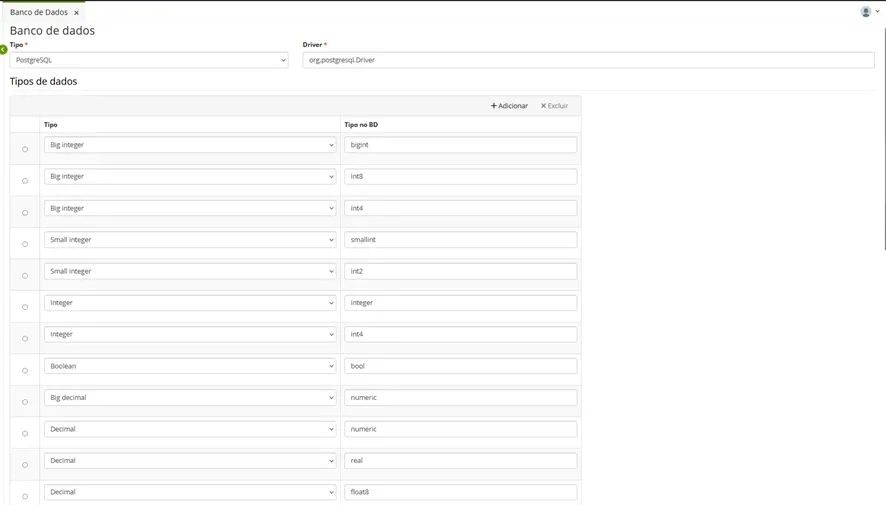
For the three types of databases that Low Code natively works with, it relates the recognized data type in the left column and the native data type of the respective database.
Example: create a table of a customer in database X using the relationship between data types. In a certain way, the database will have a column of the chosen type.