Developing a Low Code Application
Before You Begin
It is necessary to create a Database Connection.
Database Connection
Low Code requires database connections for database interfaces. It is mandatory to create a DB Connection for Low Code application development.
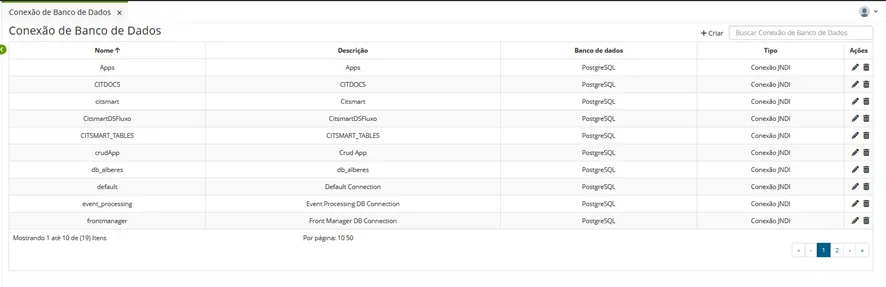
Procedure
Access the functionality through the navigation menu Low Code > Configuration > Database Connection;
Click on "Create";
Fill in the available fields:
- The types of connections can be (JNDI Connection or Direct Connection):
- For JNDI connection, enter the Context and the JNDI Name;
- For Direct connection, enter the JDBC Path, Username, and Password.
- Click "Save".
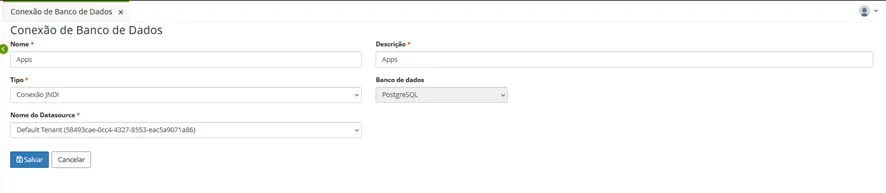
Create your DATABASE CONNECTION and your Low Code APPLICATION entry. The connection type can be JNDI (relative to your license), as shown in the example, or direct (individual Database).
For direct connections, Low Code uses the jTDS driver to establish the connection; therefore, the connection URL should follow the following example pattern:
Glossary
JNDI
(Java Naming and Directory Interface) is a Java API (Application Programming Interface) that provides a means of accessing directory services and name management in a distributed computing environment. Through JNDI, Java applications can locate and interact with resources such as database connections, message queues, web services, and other distributed components.
JTDS Driver
The JTDS driver is a Java implementation of the Tabular Data Stream (TDS) protocol used to access Microsoft SQL Server databases. It provides a JDBC (Java Database Connectivity) connection interface, allowing Java applications to communicate with SQL Server databases, execute queries, update data, and perform other operations.